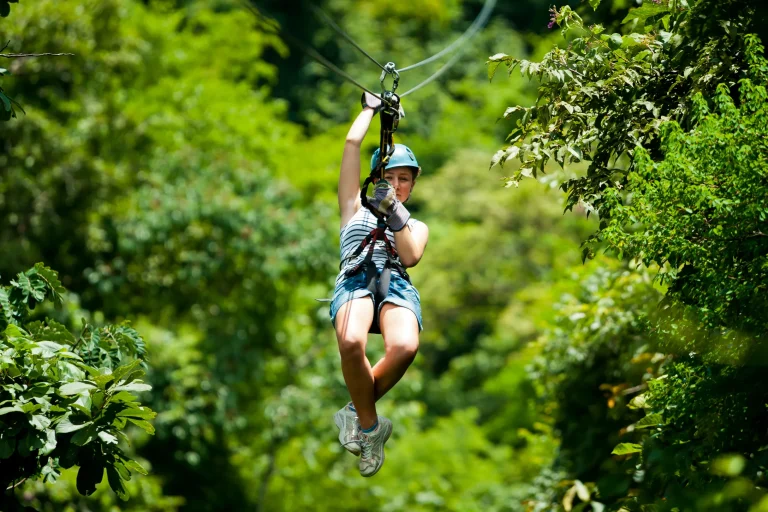
You could spend a small fortune proving you survived a zipline. You land with your gloves gritty and your ears still buzzing from the pulley, then someone offers free guide-shot photos plus upgrades like POV video, a helmet cam rental, or a green-screen hero pose. Some files hit your inbox later, some you take home today, and weather can wreck the shine. Which add-on actually earns its price on your tour?
Key Takeaways
- Most tours include free guide-shot still photos, emailed via a Fotaflo link shortly after landing; check your spam folder if missing.
- Helmet-cam rentals (about $15) capture hands-free POV for the whole tour and usually give you the footage immediately when returned.
- Checkout video packages add smoother, edited highlights by stitching POV and platform angles, making longer signature lines especially worth filming.
- Green-screen photo upgrades cost extra and suit posed, poster-style keepsakes; skip them if free course photos and POV video cover your needs.
- Avoid handheld phone filming unless allowed; use approved mounts plus tethers and zippered storage to prevent drops and keep runs safe.
Which Zipline Add-Ons Are Worth It for You?
Before you tack on extras at checkout, picture what you want to carry home from the course: a clean POV video, a few great photos, or one more shot of adrenaline with your heart thumping in your harness. On a zip line tour, rent a Viewpoint helmet camera for $15 and record hands-free runs for up to three hours. If you want raw onboard clips to keep, choose a GoPro package at checkout. For ziplining video, helmet mounts typically deliver the cleanest POV compared with chest or handheld options. For thrill seekers, add Power Free Fall for two controlled 100-foot drops or book Terminator Corner by phone for 12 aerial elements. Both need age 10 and at least 90-pound weight. To stretch the ride, try Flight of the Falcon or Ridge Runner, but watch higher minimum weights and temperature limits.
Are Zipline Tour Photos Already Included?
You might be eyeing camera rentals and video packages, but here’s the good news: photos are already included on most tours. On Zip Line Canopy Tours, Aerial Adventure Tours, and Eco-Spider SWINCAR Tours, your guides snap candid shots as you clip in, glide, and land with that satisfying zip line hum in your ears. They use Fotaflo, so you’ll get an email link to view and download the stills. That means you can keep your hands on the cables, not a camera. It’s a nice bonus after final landing. When deciding between a photo package and shooting your own clips, DIY footage can be fun, but hands-free photos are usually the easiest way to capture the moment safely on a zipline.
If you want your own first-person footage, rent a Viewpoint helmet cam for $15 for up to three hours. For smoother full-motion video or edited highlights, choose the GoPro rental or Video Package at checkout.
When Do You Get Your Zipline Photos and Videos?
Usually, the memories land in your inbox almost as fast as your boots hit the last platform. On Zip Line Canopy Tours, Aerial Adventure Tours, and Eco-Spider SWINCAR Tours, your guides snap free photos as you glide past pines and clinking cables. After you unclip and brush off a little trail dust, you’ll get an email link through Fotaflo. Check your spam folder if the forest is faster than your phone. Before you head to the first line, you’ll typically go through a quick gear fitting and safety briefing at check-in, so photo and video plans are locked in early.
Video timing depends on what you rented. If you grab the Viewpoint helmet camera, you return it after up to three hours and you leave with your footage. Reserve a GoPro camera or Video Package at checkout and you won’t have to juggle your own gear. You’ll hear wind whoosh in your clips.
Photo Package vs Single Zipline Prints: What’s Cheaper?
Although the souvenir counter can look tempting after your last glide and a final clack of carabiners, the cheapest photo option depends on how many memories you want to take home. You already get free guide-shot stills via a Fotaflo email link, so don’t pay unless you want higher-resolution files or add-on edits. You’ll hear the printer whir, but your inbox already holds the basics for free. Before you buy, use a quick reviews checklist mindset to spot whether “must-have” photo upgrades are genuinely helpful or just salesy.
- One or two favorites? Download the free shots and leave the print rack alone.
- Want several prints or a souvenir tee photo? Á la carte pricing climbs fast.
- Shopping for the whole crew? A bundled photo package can lower the per-image cost and speed up checkout.
Peek at the sample images before you decide.
GoPro Rental vs Your Own Camera: Which Wins?
If you rent the park’s Viewpoint helmet camera for $15 up to 3 hours, you get a ready mount and a runtime that matches the tour, so you can listen to the harness clicks and just fly. Bring your own GoPro and you control the sharpness, storage, and settings, but you’ve got to secure a helmet or head strap and make sure the rules allow personal cameras before you step onto the platform. Since free guide photos hit your inbox via Fotaflo, your camera choice mostly comes down to whether you want true POV footage on fast runs like the 3,400 ft Flight of the Falcon or you’d rather skip the memory card juggle and pick the Video Package. If you plan to film with a phone, use a tether or lanyard and a secure grip to follow phone filming safety tips so it doesn’t slip free mid-ride.
GoPro Rental Benefits
Settle in and picture the zipline hum under your feet while your hands stay free for the next platform. On-site you can rent the Viewpoint helmet camera for $15 and keep it for up to three hours. It snaps onto the park helmet mounts, so you skip finicky straps and crooked angles. You already get free guide photos by email, so this add-on shines when you want continuous POV video of the forest rush and the cable’s soft whir. Replay it later and hear your laugh. Unlike holding a phone, a secure strap helps prevent drops and keeps your hands free while you ride.
- Lock in smooth, hands-free footage on zip lines without juggling gear.
- Get reliable helmet fit and mount alignment from the staff setup.
- Take home immersive video for a modest fee, often cheaper than pro packages.
Using Your Own Camera
Once you’re clipped in and the platform drops away, the big question is whether you trust the park’s $15 Viewpoint helmet cam or your own GoPro to catch that rush. The rental keeps you hands-free for up to three hours, so you can focus on the line’s hum and the treetops flashing by. Just confirm battery life and that the window covers your tour.
Bring your own GoPro if you want control over settings and angles. For bright jungle light, stick to simple GoPro settings so your footage stays crisp and not blown out as you zip through sunlit canopy gaps. Check mount compatibility first, because rental helmets can be finicky. A personal head strap runs about $20 and often gives steadier, unobstructed video as you zip. Since guides email you pro photos for free, stash phones in lockers or clip them to a lanyard and film what’s unique.
Is a Helmet Mount the Best Zipline POV?
Why do so many zipline parks push a helmet-mounted GoPro as the must-have add-on? On Canopy Tours, it gives you a steady, rider-centered view and keeps your hands free while the cable hums. Your sightline feels natural because the camera sits where you look. Still, every head turn can add extra jiggle, and fast lines may vibrate more than you expect. Make sure the mount clears the required helmet and belay hardware. In humid tropical air, wipe the lens often and store the camera with silica gel packs to help prevent fog and fungus.
Helmet-mounted GoPro rentals deliver a hands-free, rider-centered view, but head turns and fast lines can add unexpected shake.
- Check the straps: they can block multi-lens phone cameras or rub your helmet fit.
- Compare value: a $15–$20 rental may come with digital guide photos, or you may prefer your own POV clip.
- Bring your own head strap: about $20 retail and often a snugger fit than shared gear.
How to Secure Your Phone on a Zipline
Clip in before you step off the platform, because a phone can wiggle out of a loose pocket the moment the line starts to sing. Use a snug chest harness or neck lanyard made for phones, then tuck it under your zipline harness or jacket so it can’t bounce free.
If the guide allows it, stash your phone in a zippered waist pouch or a harness pocket you can reach. Add a short tether or carabiner to your harness D-ring for backup. Skip handheld filming and helmet mounts unless the park approves them. They can snag or block your view. Before launch, check that straps don’t cover your lenses and snap a test shot. When the camera’s on you, keep relaxed hands and an upright posture so any pro photos look natural instead of stiff. You’ll Take home memories and your phone safe in hand.
Are Zipline Green-Screen Photos Worth It?
How much extra magic do you really get from a green-screen zipline photo? If your tour already emails free guide-shot pics through Fotaflo, the add-on is mostly about style, not proof you flew. green‑screen packages cost extra at checkout, but they can swap out tangled trees and parking lots for a crisp, poster-ready scene. For a Kahuku day trip, the green-screen upgrade can also make your photo look polished even when your stops are simple and your timing is tight.
- Buy it if you want posed family shots or a branded keepsake that looks like it came from a studio.
- Skip it if you’ve got plenty of course photos plus a GoPro or the $15 Viewpoint helmet-cam rental.
- Check the fine print on delivery and rights so you don’t pay for tiny files or limited use.
Otherwise, the free action shots often nail the wind-in-your-face vibe perfectly.
What’s Actually in a Zipline Video Package?
A zipline video package usually stitches together guide-mounted camera footage with a few platform camera clips, so you get rider POV plus those wide shots where the trees blur and the cable hums. You won’t always see every single line, but you will get the best angles from your tour and often your guide’s free photos too. Some tours also offer group photos so everyone in your party ends up in the shot at least once. After checkout, you’ll get an email link or digital download, and you can often add a GoPro-style helmet rental on the spot if you want your own shaky-laugh track.
Included Clips And Angles
Picture the moment you step off the platform and the cable starts to sing under your pulley. Your basic package usually means free guide-shot photos, snapped from the landing deck or mid-ride. They catch your grin, the brake tap, and that quick look down through the trees.
Upgrade footage changes the angles you get:
- Guide highlights: launches, platform waves, and a few key lines.
- Helmet-cam rental: steady first-person POV across multiple zips plus platform shifts.
- Premium video: longer clips, sometimes the entire final run, with an edited option if you want movie vibes.
Handle-mounted angles smooth out the bounce when you pick up speed fast. Because speed and views are two big markers of a memorable run, capturing those moments with length, speed, views, and guides in mind helps you judge whether the upgrade matches the tour’s best features. If you’re tackling a signature line like Flight of the Falcon, continuous video feels worth it.
Delivery Format And Timing
Once you unclip at the end of your last line and your gloves still smell like warm cable, the big question becomes where your photos and video actually show up. For Zip Line Canopy, Aerial Adventure, and Eco-Spider SWINCAR, you’ll get free guide-captured shots. Staff review them after the tour and email a Fotaflo link. If you spring for photo packages or add video, timing shifts. A Viewpoint helmet camera rental is $15 and records up to 3 hours from your perspective. Branded GoPro rentals and Video Package add-ons, booked at checkout or rented on-site, deliver clips and angles. You’ll get the files immediately, or as a download when you return the camera. Gift vouchers come by e-delivery and you choose tour time later. Since you’ll likely be carrying a phone or small camera for the day, pack it in a waterproof case so your devices stay protected while you’re gearing up and between lines.
Does Weather Ruin Zipline Video Quality?
Chase the clouds a little and you’ll see that weather doesn’t ruin zipline video so much as it changes the look and sound of your ride. On rainy, muggy runs, droplets spot the housing and fog the lens, so details soften unless you wipe it often and use waterproof protection. Bright overcast light can be your secret weapon on canopy zipline tours, giving even color without harsh noon shadows or blown highlights. Most North Shore zipline tours run in light rain under rain-or-shine policies, so you can still come home with usable footage even when the forecast looks iffy.
Weather won’t ruin your zipline video, it reshapes it; rain softens details, while bright overcast delivers clean, even canopy color.
- In wind, lock in stabilization and add a wind muff so the whoosh doesn’t turn into static.
- In heat, expect faster glides and raise shutter speed to cut motion blur.
- If you want control, rent a Viewpoint helmet camera for up to three hours, or mount your own GoPro.
What to Ask Before Buying Zipline Add-Ons
Before you click any shiny add-on at checkout, ask a few quick questions so you don’t pay twice or miss a must-do corner of the course.
First, ask if photos come with your tour. Many Tours email Fotaflo shots, so a photo package may be extra. Next, confirm helmet or GoPro rental price and time. At Viewpoint, it’s $15 for up to 3 hours. Ask if you can mount your own camera. If you’re planning to share clips, a quick Reels workflow can help your zipline footage look fast and polished. For feature add-ons, check limits. Flight of the Falcon may need 115 pounds minimum, and hot days can lower max weight. Then ask how to book. Terminator Corner might require a phone call or group minimum. Finally, ask about time. Some routes add one to two hours, and packages may include lunch.
Frequently Asked Questions
Do Zipline Add-On Purchases Require Waivers or Extra Check-In Time?
Yes, most add-ons use the same waiver, signed during Waiver timing with your tour. You’ll often sign extra equipment/photo releases at check-in. Bigger experiences may add screening and 1–2 hours; some group extras need separate waivers.
Can Kids or Minors Buy Photo and Video Add-Ons?
Yes, kids can buy photo/video add-ons, and you won’t need a treasure chest of paperwork, just Parental consent. You can email free guide photos to them, or prebuy video/helmet cam rentals as vouchers, if they qualify.
Are Photo and Video Packages Refundable if You Cancel Your Tour?
Usually, you won’t get refunds for included tour photos if you cancel, because they’re delivered only after you ride. You may get refunds for prepaid GoPro/helmet-cam rentals, depending on the operator’s Refund policy at checkout.
Do Zipline Companies Share Your Images on Social Media by Default?
No, most zipline companies won’t share images on social media as Default Sharing?. In fact, 0% of your photos go public unless you consent. Ask before you launch, skip releases, and request they don’t post.
Can You Buy Digital Downloads Later if You Skip Add-Ons Onsite?
Yes, sometimes. You can make Post Booking Purchases via the emailed Fotaflo gallery link for upgrades/downloads before it expires. If you skipped checkout add-ons, ask staff after; some sell later downloads/rentals, but it isn’t guaranteed there.
Conclusion
Funny how the “free” photo can cost you the best memory. You land with dusty gloves and a buzzing helmet, then a Fotaflo link pings your phone. If you want that clean swoop sound and forest blur, you’ll pay for POV video or a GoPro rental. Bundles help if your group laughs loud. Ask about delivery time, usage rights, and rain. Then pick the add-on that fits your bragging budget. You’ll thank yourself later, too.