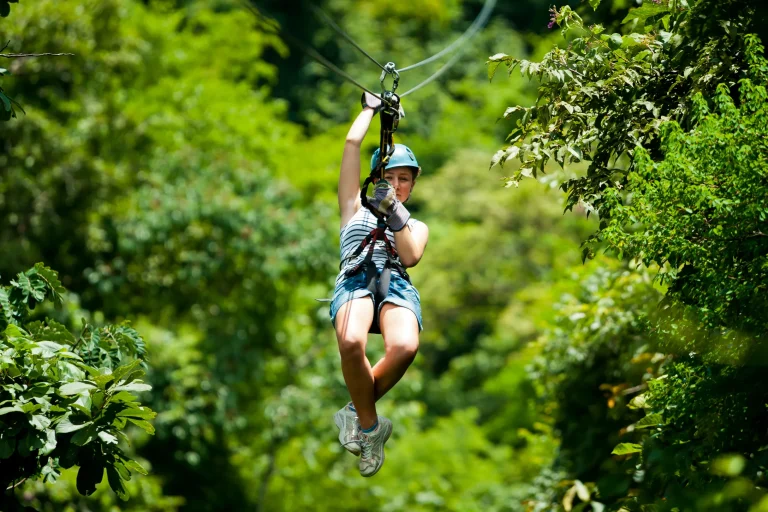
You’re gliding through quiet treetops while your camera fights chaotic blur. On the North Shore, the canopy throws patchy shade and the pulley hums inches from your helmet. You’ve got seconds to lock focus, set a fast shutter, and keep your hands steady on a swaying line. Do you trust burst mode, a GoPro mount, or a quick phone grab. Get one setting wrong and you’ll bring home leaves and regret…
Key Takeaways
- Confirm North Shore rules on cameras and mounts; use only approved gear and immediately stow equipment if staff instructs.
- Tether every device with a strong wrist strap plus lanyard; double-check attachment clips and keep gear in zippered pockets between lines.
- Use burst/continuous shooting and start 0.5–1 second early to increase keeper rate during fast passes.
- Set shutter speed to 1/500s minimum, ideally 1/1000s, and let Auto ISO rise (cap ~800–1600) in canopy shade.
- Use AF-C/AI Servo tracking or pre-focus on a marker at the pass zone, and frame hands, harness, and line for grounded motion.
North Shore Zipline Photo Rules + Safety Checks
Before you even clip into the first line, check in with the North Shore zipline operator about photo rules so you don’t end up hiking in with gear you can’t use. Many courses ban loose cameras, so ask what’s allowed and what must stay in the car. Since phones are often allowed only if secured, choose strap options designed to keep your device tethered and out of the drop zone. When the guide gives the safety briefing, listen like it’s the soundtrack of the forest. Only use mounts staff approves, and back them up with redundant tethers, wrist strap plus lanyard. Fold away anything that flaps or snags. On platforms, request a spot to shoot and keep bags and tripods off the active path. If staff tells you to stow gear or shift, do it fast. You’ll capture the perfect moment as wind hums through pines.
Pick Your Camera: Phone vs GoPro vs DSLR
How do you choose the right camera when you’re clipped in, gloves on, and the next line is already singing in the trees? Start with what you can safely attach. Phones can surprise you in bright gaps of sun, but under the canopy they’ll show more noise and softer detail. A GoPro or other action cameras shine here. For ziplining, helmet mounts keep your hands free while giving a stable, forward-facing view. You can mount one to a helmet or chest, hit record, and let 4K, stabilization, and 60 to 240 fps slow motion smooth out the rush of cables and leaves. If you want the most control and richer files, an APS‑C DSLR like a Nikon D3100 with an 18–55mm zoom frames both you and the valley. Just confirm the course allows it, and skip anything loose.
Fast Setup: Burst, AF Mode, Wrist Strap
Before you clip in and hear the cable hum, switch on burst mode so your shutter can rattle off a quick stack of frames as the rider flashes by. Set autofocus to continuous with a single tracking point so focus stays glued to the moving helmet instead of hunting the trees. Then cinch a sturdy wrist strap or tether and check the clip twice, because nothing kills the vibe like watching your camera try ziplining on its own. For extra security while filming, add a phone tether so even a slip of the grip won’t send your device down the canopy.
Enable Burst Mode
Once you hear the pulley start to rattle and the line hums under your gloves, burst mode becomes your best friend. Hold the shutter or pick high speed continuous so you capture a rapid run of frames. On a phone or action cam aim for 10 fps or more. You’re buying chances for one crisp face and hair.
Before you launch clip a wrist strap or tether to your wrist or harness. Keep a relaxed posture with your hands lightly gripping the trolley so your hand position looks natural in the final frames. Guides like that and your camera won’t go surfing into the ferns. If you’re on a DSLR like a Nikon D3100 set shutter priority at 1/500s or faster and Auto ISO capped near 1600. Precompose on the passing zone and lock focus at that distance. Then squeeze and enjoy the whir.
Set Continuous Autofocus
Usually the biggest upgrade happens with three quick clicks: burst mode on, continuous autofocus set, and a wrist strap snug around your skin. Now switch your focus mode to AF-C on Nikon or AI Servo on Canon so the camera keeps chasing your rider as they hum down the line.
Pick a dynamic or 3D AF area so the points can hop across the frame. Pre-focus on the spot where the trolley will pass, then hold back-button AF or half-press as they approach and fire your burst. Start at 1/1000s to freeze the spray of rainforest mist and the whirr of wheels. If the canopy’s dim, keep continuous autofocus and let Auto ISO climb to about 1600 on APS-C bodies for clean, sharp keepers. In humid tropical air, wipe moisture off the front element and keep a lens cap on between runs to prevent condensation buildup.
Secure Wrist Strap
Your autofocus can track like a champ, but it won’t matter if your camera slips when the line starts to sing and your gloves feel slick with mist. Use a sturdy wrist strap rated for action cams or compact DSLRs. Aim for 20 to 50 kg break strength. Thread it through the camera lug, wrap it snug on your wrist, then double knot or clip the safety tether.
In bright jungle light, use a simple GoPro setup with a faster shutter to help freeze zipline motion.
Before you launch, set continuous burst so you can hold the shutter for 6 to 20 fps. Switch to AF-C with 3D or zone tracking. Practice bringing the camera to chest or eye level with the strap on. If you’re using a selfie stick, keep the strap on anyway. Gravity loves souvenirs on the forest canopy.
Shutter Speed for Sharp North Shore Zipline Shots
On North Shore lines, you’ll want a minimum shutter speed of 1/1000s to freeze riders who rush toward you with that cable hum in the background. If you want motion instead of a statue, you can pan and drop to about 1/125–1/250s so the rider stays sharp while the jungle turns to soft streaks. For even better results, choose best seats and angles on the platform so you can shoot cleanly down the line without railings or other riders cutting into your frame. When the canopy shade makes everything dim, you’ll bump ISO to hold your speed and keep faces crisp, and shutter-priority or manual with auto-ISO helps your camera keep up without getting noisy.
Minimum Shutter Speed Targets
Because riders can whip past the platform at 20 to 40 mph while leaves flicker in the North Shore canopy, start with a shutter speed of at least 1/500s to lock in sharp faces and taut harness straps. Aim for at least 1/500s to reliably freeze most zipline riders moving at typical speeds (20–40 mph) and handheld camera movement.
If you zoom in with a telephoto or an APS-C crop, bump it to 1/1000s since every tremor looks bigger. Under shade, set shutter priority at 1/500 to 1/800s and let Auto ISO climb, but cap it at 1600. For group zipline photos, start tracking the first rider early so you can frame wide enough to include everyone who’s coming in behind them. For chest or helmet action cams, pick 1/1000s or the highest practical shutter and switch on stabilization. You’ll hear the pulley buzz and capture crisp frames.
Freezing Action Vs Motion
Usually the big choice up on a North Shore zipline isn’t the view, it’s whether you want the shot to look frozen in time or buzzing with speed. For crisp faces, flying hair, and leaves whipping past, set shutter speed to 1/1000s or faster in bright runs. When you want a streaky jungle backdrop but a sharp rider, drop to 1/250–1/500s and pan with them like you’re following a surf line. On breathtaking views runs, lock exposure early so the scenery stays rich while you track the rider.
| Look | Setting |
|---|---|
| Frozen detail | 1/1000s+ |
| Speed blur | 1/250–1/500s + pan |
In shaded canopy, bump ISO 400–1600 to hold 1/500–1/1000s on an APS‑C kit camera. On a GoPro, shoot 60–120fps so slow‑mo frames stay sharp. Use Tv/S or manual, pre-set tracking, and test on slower stretches. Hear the trolley clack and still nail it.
Low-Light Speed Tradeoffs
Fast shutter speeds feel easy in full sun, but the North Shore canopy loves to steal your light right when the trolley starts clacking and the rider rockets past. Set shutter speed to 1/500s as your baseline, and bump to 1/1000s when you want crisp eyes and a grin you can almost hear.
In shade, push ISO to 800–1600 on an APS-C kit body like a D3100. Use shutter-priority with Auto ISO capped at 1600 so the camera protects your speed without turning the forest into sandpaper. If your tour is known for fast speeds, assume you’ll need the higher end of that shutter range more often. Between runs, chimp quickly. If faces go dark against bright sky, dial +1 to +2 EV. Want artful streaks? Try 1/30–1/60s and pan smooth. Expect a few funny misses. Listen for the pulley and time your click.
Auto ISO for Canopy Shade (With a Max Cap)
Once you slip from bright launch platforms into leafy canopy shade, your Nikon D3100 has to juggle light that changes as quickly as the forest flickers past. Turn on Auto ISO and set the max to 1600 so the camera can climb in the dark while you keep noise on a leash. Just like comfort from guides helps nervous beginners stay relaxed on a zipline tour, these settings let you focus on the ride instead of fighting your exposure. Shoot in shutter priority at 1/500s to freeze swinging harnesses and passing trunks, or drop to 1/250s on a mellow line. Start around f/5.6 on the 18–55mm for a clean slice of depth and decent light. Set the minimum ISO to 200, or 400 if it’s really dim. Glance at the ISO readout between runs. If grain bothers you later, cap it at 800 and enjoy the hush of needles rushing by.
Meter for Trees, Not Sky (Easy Exposure Fix)
When the zipline cuts across a gap in the canopy and the sky starts flashing through the leaves, your camera’s meter can panic and pull the whole shot darker. To keep riders bright, meter for trees,not sky. Use spot or center-weighted metering on a trunk or shaded leaves at chest height, then hit AE-L and recompose. If you’re driving in, build a few minutes for scenic viewpoints en route to North Shore Ziplines so you can dial in these settings before you’re clipped to the line.
| Scene | Meter on | Result |
|---|---|---|
| Sky gap | Tree bark | Faces pop |
| Deep shade | Shaded leaves | Greens hold |
You’ll hear the cable hum, but your exposure won’t wobble much. If your camera averages the whole scene, dial in +1 to +2 exposure compensation when sky grows large. Pair shutter-priority at 1/200s with Auto ISO capped near 1600 so motion stays crisp. Check the histogram so skin tones don’t crush left.
Pre-Focus Before Launch (Simple Marker Trick)
Exposure can stay steady even as sky peeks through the canopy, but focus can still wander at the worst moment. Use pre-focus before launch (simple marker trick). Before the rider clips in, pick a fixed marker your guide uses, like a notch in the railing or a numbered sign. Stand at the platform edge and focus on that spot with AF-S on your Nikon D3100 or phone, then lock it by switching to MF or holding back-button AF. With the 18–55mm kit lens, set the distance to match that marker, usually 3–10 meters. Take a manual exposure reading in shade, then shoot shutter-priority at 1/500s or faster. Ask the guide to launch riders through your marker. Time it right after check-in so you’re ready as the next rider steps up to clip in and roll onto the line. Your camera stops searching, and faces stay crisp.
Shoot Bursts to Nail the Best Frame
As your rider zips in with that cable hum and a blur of helmets and gloves, hold down the shutter and let burst mode fire 10 to 30 frames per second. Set continuous shooting on your phone or DSLR and keep your shutter around 1/500s or faster so each frame stays crisp. Then you can scroll the sequence and pick the one where the smile lands and the pose looks fearless, not mid-squeal. If you’d rather stay fully in the moment, compare DIY bursts to a guide-run photo package that’s timed for the best angles mid-ride.
Use Burst Mode Settings
Hammer the shutter and let burst mode do the heavy lifting while you fly across the canopy and the cable sings. On your phone, hold the shutter for burst mode. On a camera, switch to Continuous High and shoot 10 to 30 frames. Begin 0.5 to 1 second early so lag won’t steal the moment. Lock in 1/500s or faster and use high fps, 10 to 30 on action cams, 5 to 10 on DSLRs. Keep Auto ISO with a 1600 cap. Choose RAW or RAW+JPEG. Before you launch, listen for the safety briefing in plain English so you’re clear on the rules and when you’re allowed to shoot.
| Gear | Burst rate | What you feel |
|---|---|---|
| Phone | hold shutter | wind in your teeth |
| DSLR | CH 5–10 fps | cable hums |
| Action cam | 10–30 fps | leaves streak past |
Pick Frames From Sequences
Scrubbing through a burst is where the real win happens, because the zipline gives you speed and chaos in the same breath. You might hear the trolley rattle and feel spray in the air, but your job is simple. Shoot in burst/continuous mode and let it rip at 10 to 30 frames per second. Keep shutter speed at 1/1000s, or 1/500s if clouds roll in. Turn on AF-C and pre-focus on the lane the rider will cross so the camera doesn’t hunt. Use Auto ISO with a cap like 1600 to keep the burst snappy. Afterward, do a quick pass in your editor using a fast, polished workflow to scrub, flag winners, and export for Reels without overthinking it. Afterward, zoom to 100 percent and pick the frame where eyes pop and hair flies. If you filmed at 60 to 120 fps, extract a sharp still for printing.
Try Panning at 1/2s (Optional Motion Blur)
When you want your zipline shot to feel fast, try panning at around 1/2 second and let the jungle streak into soft lines behind your rider. Set your shutter near 1/2s and switch to continuous drive so you can grab a burst and choose the cleanest sweep. Pre-focus or use back-button focus then lock on their face and track from your shoulder through the end of the frame as you press the shutter. If you’re waiting in direct sun between runs, use sun and heat strategies like stepping into shade and hydrating so you stay steady for the next pass.
Plant your feet staggered and rotate from your hips like you’re following a flying canoe. Keep ISO 100–400 and stop down to f/8–f/11 to tame bright North Shore sun. Review and nudge shutter 1/3 stop at a time. If the rider’s smeared try 1/4–1/5s. If the leaves look frozen go longer.
GoPro Mounts: Helmet vs Chest vs Handheld
On a zipline, your GoPro mount decides what the story feels like, from swaying treetops and blue sky to the cable humming right in front of you. Helmet mounts sit high and slightly forward, so you grab more horizon and canopy. You’ll also see some head-bob, so turn on HyperSmooth and shoot 1080p/60 or 4K/30 to keep motion clean. Most tours provide key safety items like helmets and gloves, so you typically only need to pack your own camera mounts and tethers.
Chest mounts ride lower and steadier. They frame your hands, harness, and the line for a fast, grounded look. Add a tether and record 2.7K/60 or 1080p/120 for silky slow-mo. Handheld gives you the most control with a 12 to 18 inch wrist-strap pole, EIS, and a 1/125s shutter. Use approved gear and check course rules, and sync clips with a quick clap at takeoff.
Pose Tips: Face Visible, Bright Colors, Big Energy
Always give the camera a clear shot at your face because that’s where the story lands, even with wind snapping and the cable singing under your trolley. When you can, face the camera, even if you steal a quick look over your shoulder mid flight. Tame long hair into a high ponytail or pin it back so it doesn’t whip across your eyes. Pack your phone or camera in a secure zippered pocket so it stays protected between lines and is ready the second you launch.
Dress like a marker in the jungle. Hot pink, coral, or safety orange pop against greens and browns. Keep your posture streamlined with legs together and ankles crossed so your silhouette stays clean. Then bring big energy. Flash a grin. Throw a shaka, thumbs up, peace sign, or fist pump. Small fidgets disappear at 1/200s, but bold moves read in bursts.
Frequently Asked Questions
What’s the Best Time of Day for Flattering Zipline Lighting on North Shore?
Go mid-morning (9–11am) or late afternoon (3–5pm) for flattering North Shore zipline light; you’ll get softer angles under the canopy. Skip 11–2. For Golden hour drama, ride 45 minutes before sunset and raise ISO accordingly.
How Do I Keep My Lens From Fogging in Humid Rainforest Canopy?
Like a time-traveling daguerreotypist, you’ll prevent lens fog by sealing your gear in a bag 10–15 minutes to acclimate, adding Lens Desiccant Packs, wiping anti-fog sparingly, avoiding swaps, and warming glass with microfiber gently first.
Should I Use a UV or Polarizing Filter While Ziplining?
Use a UV filter only for protection; it won’t change exposure much. Polarizer recommended when you’ve got bright light and glare, but it costs 1–2 stops, avoid deep shade or you’ll push ISO past 1600 there.
How Can I Protect My Camera From Rain and Mud During the Tour?
Bring Weatherproofing Gear: put your Nikon in an IPX4–IPX6 rain sleeve, or use a sealed action cam. Seal phones in a clear dry bag. Add UV/filter, wipe often, and strap everything to your wrist securely.
What’s the Simplest Way to Back up Photos Immediately After the Tour?
After one ride, you plug your GoPro into your phone and copy everything for a quick local backup, then trigger an Instant Upload to Google Photos. You’ll leave with two copies even if the card fails.
Conclusion
Clip in. Check your tether. Then let the canopy do its thing. With burst mode, AF‑C, and a 1/500s shutter, you’ll freeze the grin, the gloves, and the cable singing overhead. Auto ISO helps when shade turns the greens deep and slick. Start shooting a half‑second early and you’ll catch the clean pass. Think of your settings like a seatbelt for light. Now ride, laugh, and review.